Table of Contents
5 Reasons to Use the Ultimate Free DST to PES Converter Online
If you work with modern embroidery machines, you have probably run into this frustrating scenario. You just finished a flawless digitizing session in Wilcom 4.2, only to realize your client needs the design in a different format. Your design is in a Tajima DST file, but the machine only accepts Brother PES files.
Spending hundreds of dollars on proprietary software just to change a file extension feels wasteful. That is exactly why finding a reliable free DST to PES converter online is essential for both hobbyists and commercial digitizers.
To solve this problem, we built the Stitch Realm Embroidery File Converter. It is a completely free, browser-based tool that transforms your files instantly with zero hidden fees and no subscriptions.
1. 100% Browser-Based With Total Privacy
When you use our free DST to PES converter online, your proprietary designs never leave your computer.
All file conversion happens locally directly within your browser using pure JavaScript. This guarantees complete privacy for your custom digitizing work. It also means you get lightning-fast conversions without waiting for server uploads. Once the page fully loads, the tool even works offline for your convenience.
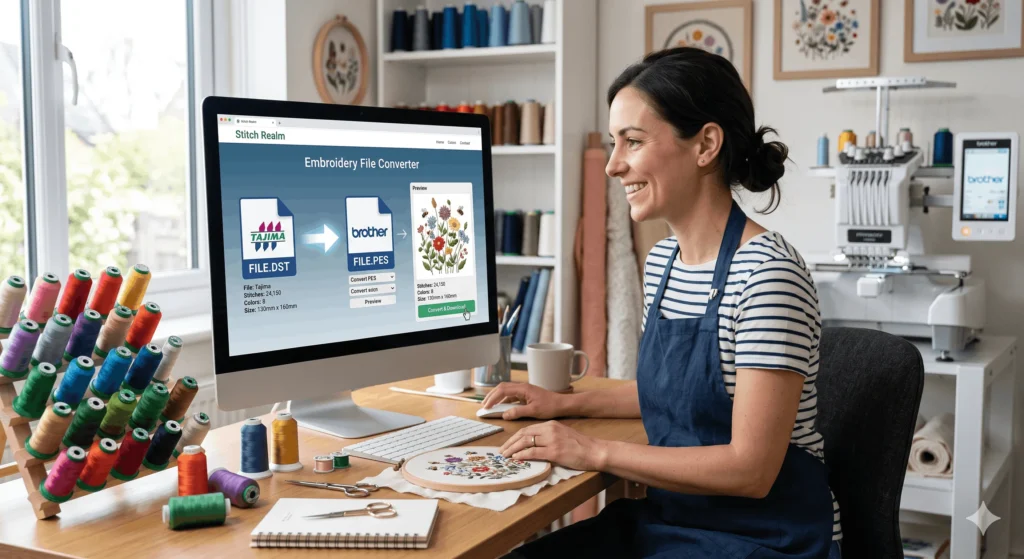
(Insert Image 1: A professional workspace with a laptop showing the converter and embroidery threads. Image Alt Text: Using a free DST to PES converter online on a modern laptop)
2. Three Incredible 3D Preview Modes
Before you download the converted file and send it to your embroidery machine, you need to see exactly what it looks like. Our tool offers three unique preview modes:
- Simple (2D): A clean, flat outline of your design showing all precise stitch paths.
- Realistic (2.5D): Threads rendered with shadows and a silk sheen on fabric.
- 3D (Interactive): A full WebGL view you can freely rotate to inspect from any angle.
This feature is invaluable for catching alignment errors before you ruin a good piece of fabric.
3. Generate a TrueView Realistic Image Export
Whether you are running a high-end Brother Innov-is V3 or a multi-needle commercial setup, showing clients a realistic preview helps close sales.
Our converter lets you generate a high-resolution, print-ready PNG image of your design. It features raised thread geometry and proper depth rendering. This TrueView export comes with a subtle Stitch Realm watermark, making it perfect for your digital marketing campaigns and professional portfolios.
(Insert Image 2: A close-up of a realistic digital embroidery preview. Image Alt Text: 3D realistic preview of an embroidery design before conversion)
4. Download a Professional Printable Worksheet (PDF)
Every professional digitizer needs documentation. When you use this free DST to PES converter online, you can also download a comprehensive PDF worksheet for your records.
This professional worksheet includes a full stitch preview, exact dimensions in millimeters, and the complete thread color sequence. It also details the total stitch count and jump counts. This makes it incredibly easy to track jobs and communicate with your embroidery shop staff.
5. Detailed Statistics: DST vs. PES Formats
Knowing which format to use is just as important as the conversion itself. Here is a quick breakdown:
Tajima Format (DST) The DST format is the absolute industry standard for commercial digitizers. It offers universal compatibility and a very compact file size. However, it is limited to one million stitches and does not store specific thread color information natively. (External Link Opportunity: Highlight “Tajima Format” and link to an authoritative source like Wikipedia’s Embroidery format page or Tajima’s official site).
Brother Format (PES) The PES format stores color information directly inside the file and supports over 100 thread colors. It is the preferred choice for complex, multi-color designs used on Brother, Bernina, and Janome machines.
(Insert Image 3: A comparison graphic between DST and PES file structures. Image Alt Text: Comparison between Tajima DST and Brother PES embroidery formats)
How to Use the Free DST to PES Converter Online
Ready to get started? Converting your embroidery files is incredibly simple:
- Drag and drop your original file onto the converter interface.
- Toggle between the Simple, Realistic, or 3D preview modes.
- Review the exact stitch count, color changes, and dimensions.
- Select your target output format.
- Click “Convert & Download” to instantly receive your new file.
You can also optionally download the PDF worksheet or the TrueView PNG image for your personal records.
Why Choose This Over Expensive Software?
Typical embroidery digitizing software can cost anywhere from $200 to over $800 per year. While those tools are great for creating designs from scratch, paying that much just to change a file format is unnecessary.
Our tool provides interactive 3D previews, total privacy, and instant format conversion completely free of charge. Save your hard-earned investment for quality threads, stabilizers, and actual digitizing software when you truly need it.
(Internal Link Opportunity: Link the words “quality threads, stabilizers” to one of your Stitch Realm store product pages or a blog post about embroidery supplies).
Start Converting Your Designs Today
There is no registration required, no payment gateways, and absolutely no daily limits.
If you have any technical questions, check out our FAQ section or contact the Stitch Realm support team. We are dedicated to helping embroiderers, freelancers, and hobbyists succeed without the bloated software costs.